
Do you remember the announcement of Copilot being able to prioritize your inbox in Outlook? I do. It took a while to get here, but it’s arrived in my tenant now!
Let’s get started by saying I am by no means an Outlook power user. I have an inbox, no folders, and only a single rule built in. I should use the flagging system more. I also do not have any shared mailboxes. Basically, if I get e-mail, it’s either spam, something important internally or a customer. At my company, we are very good at using Teams for internal communications. It’s bliss.
But that doesn’t stop me from being able to show what this new Copilot feature looks like in action.
In the new Outlook, open your settings and go to Copilot. Select ‘Prioritize’ to enable the setting. You can choose to have a little AI summary at the top or not, and if you’d also like a low priority label. Under customize you can enter a few keywords to help Copilot determine what is high or low priority. If you don’t fill in anything, Copilot will try it’s best to guess a priority. For the best results, give it some extra instructions.
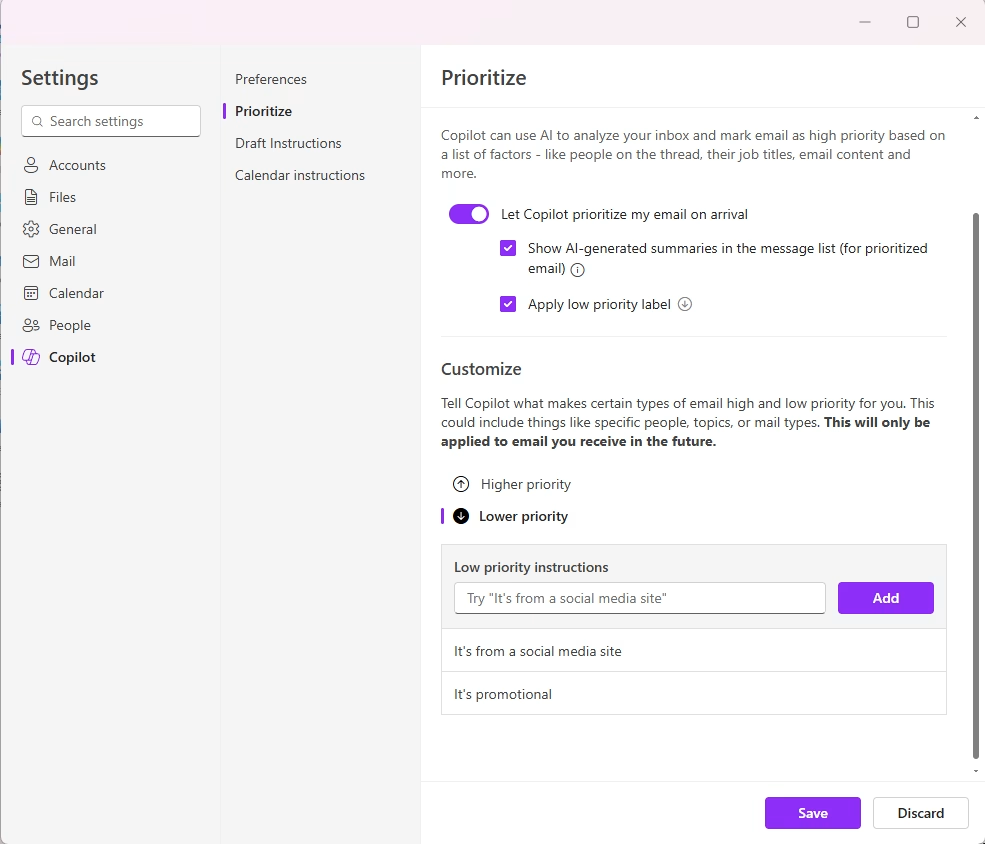
This doesn’t work for email you already received, but it will apply to any future email you receive.
Now that we’ve set it up, this is what it looks like when you receive a priority in your email:
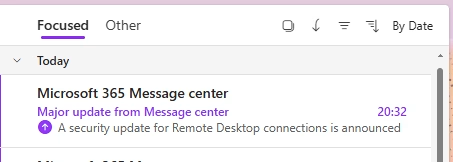

As you can see, the first line of the email is flagged with an arrow pointing upwards. For low priority, this email is pointing downwards. Now, I haven’t been able to find a way to set this up in the classic Outlook. You can set this up in the new Outlook (or online Outlook) and it will work in the classic Outlook. Then it looks like this:
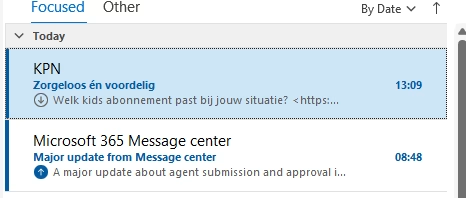
The arrows take the colour of the theme your Outlook client is using.
And what else can it be used for? Well, I tried asking Copilot to give me an overview of all my high priority email. And it didn’t list any of the ones that have been flagged as high priority. So for now, it’s a nice extra indicator in your overview. But as with all Copilot features, keep trying and maybe next week Outlook will know what email is flagged as high priority.